What is Data Integration? A Complete Guide
Loading...
The TECHVIFY Team is a group of experienced professionals passionate about technology and innovation.
In today’s ever-changing business world, understanding data integration is essential. Important information is scattered everywhere, from your company’s databases to customer activities on your website. You need to be well-versed in different integration techniques.
Having all your data merged and available at one point can help your organization make quick, informed decisions. Make sure you’re on top of it.
In this article, we will explore “What is Data Integration?” and the types of data Integration that will help your company.
Data integration is combining information from various places into one clear picture. You start by collecting the data, cleaning it up, mapping it out, and transforming it. This makes it easier for your analytical tools to give precise and actionable insights.
There’s no one-size-fits-all method for integrating data. Yet, most solutions have some shared components: a collection of data sources, a central server, and users pulling data from that server.
You’d ask the primary server for specific data in a standard setup. This server would then pull the necessary data from both internal and external sources. After consolidating and preparing the data, it’s sent back to you, ready for use.
Enhance Business Decisions
Integrating data offers a comprehensive view of operations, allowing you to identify valuable trends and insights and save time on manual entry.
Elevate Customer Experiences
Understand your customers deeply.
Reduce Costs
Automated data integration minimizes manual tasks and consolidates resources, leading to financial savings.
Unlock Revenue Opportunities
A clearer picture of customer behavior reveals growth areas and strategic shifts.
Boost Innovation
Strengthen Security
Centralized data helps in
Promote Collaboration
Learn more:
When you manually integrate data, you’re merging data from various sources without the help of automated tools. You’ll likely use basic methods like copy-paste and tools like spreadsheets. This approach might work for smaller projects with minimal data but is challenging.
Benefits:
Drawbacks:
Remember, the choice between manual and automated methods should align with your organization’s needs and the scale of the data project.
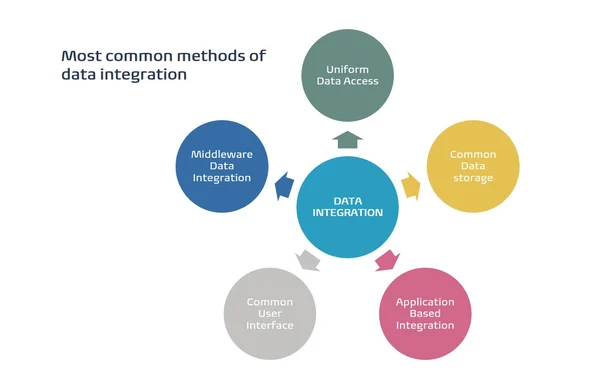
Middleware is a software layer that helps different systems communicate. By using middleware, you can efficiently integrate data from many sources.
Benefits:
Drawbacks:
Instead of storing data centrally, you create an overlay, providing a unified access point across multiple data sources.
Benefits:
Drawbacks:
By storing data in a central spot accessible to multiple applications, you’re looking at a consistent data environment across your organization.
Benefits:
Drawbacks:
Integrating data directly within an application brings data connectivity within the app itself.
Benefits:
Drawbacks:
| Zapier | With Zapier, you can easily connect and synchronize your favorite web apps like Google Docs, Slack, and Quickbooks. This tool empowers you to automate your workflows, allowing for smoother sharing and data transfer between over 1,000 web applications. It’s about making your tasks more efficient and streamlined. |
| Automate.io | Are you looking to integrate your cloud applications without the fuss of coding? Automate.io is your go-to data integration software. Its intuitive drag-and-drop interface allows you to establish connections with popular apps like Gmail, Trello, and Dropbox. Set your desired triggers and see the magic happen. On the free plan? You get to set up to 5 bots with 5-minute intervals. |
| HVR Software | If your organization handles massive amounts of data, consider HVR Software. Designed for enterprise-level integration, it ensures that even vast data volumes have little to no strain on your database. Experience real-time analytics and effortlessly transfer data between on-premise and cloud environments. However, keep in mind it’s best suited for larger enterprises. |
Ultimately, the kind of data integration right for you hinges on your organization’s specific needs and the systems you work with. Take the time to assess and weigh the pros and cons of different methods to find what suits your scenario best.
Gathering data from numerous sources can require a lot of time and effort. Instead of dedicating extended periods to develop and upkeep these integrations, consider contacting TECHVIFY for the best data team and get our most insightful consultant.
Please feel free to contact us for a free consultation: Data Engineering Services
TECHVIFY – Global AI & Software Solution Company
From Startups to Industry Leaders: TECHVIFY prioritizes results, not just deliverables. Accelerate your time to market and see ROI early with high-performing teams, AI (including GenAI) Software Solutions, and ODC (Offshore Development Center) services.

One simple example is ensuring your customer support system and accounting system are looking at the same customer data.
When you're working with data from various resources, it can be challenging. These data often come in different shapes and forms. To merge them, you might find yourself doing a lot of adjusting and connecting. Keep this in mind as you tackle data integration tasks.