Loading...

The TECHVIFY Team is a group of experienced professionals passionate about technology and innovation.
Consumers expect their applications to work flawlessly every time they use them. If your app is riddled with performance issues, bugs, and glitches, it can quickly lose its user base due to poor quality. As a result, testing your software is essential to ensure project teams thoroughly check, verify, and validate the functionality of the developed product, thereby delivering an optimal user experience.
In today’s fast-paced development environment, both manual and automated testing are often used together to produce high-quality software for customers. Each approach has its strengths and limitations, and understanding when to use them is key to successful testing.
This blog will cover manual and automated testing fundamentals, highlight the difference between manual testing and automation testing, and explore the best scenarios for each method.
Manual testing involves testers performing test cases by hand, without the aid of automated tools, and relying on any automation tools. In this approach, testers take on the role of an end user, methodically exploring the software to identify any unexpected behavior or bugs. This process plays a fundamental role in the software development lifecycle by ensuring the software is user-friendly and free from errors before it reaches its intended audience. Manual testing focuses on key aspects such as functionality, usability, and performance, providing a hands-on assessment that automation tools may overlook.
Test automation is the process of using specialized software tools, such as Jenkins, CircleCI, Travis-CI, GitLab CI/CD, GitHub Actions, Bamboo, and Azure Pipelines, to run predefined test scripts on software prior to its release into the production environment. These tools can run tests repeatedly at any time, significantly improving the efficiency, accuracy, and coverage of the testing process.
Automation is particularly valuable for quickly identifying defects, ensuring that new features or changes do not break existing functionality (regression testing), and improving the overall quality of the software. It is especially beneficial for large-scale projects where manual testing would be too time-consuming and prone to human error.
Learn More On:
Regardless of the type of testing employed, all testers must follow the Software Testing Life Cycle (STLC). This structured process consists of six key stages designed to ensure that all software quality objectives are met.
The first stage, Requirement Analysis, provides the QA team with a comprehensive understanding of the testing objectives. This foundational step allows them to create a detailed Test Plan, which outlines the specific steps to execute the tests and defines the expected results.
Once the test environment is set up, testers manually execute the test cases and record the outcomes. If any bugs are identified, they document the details and communicate them to the development team, who will begin troubleshooting the issues. After the development team resolves the defects, the QA team manually retests the impacted functionality to ensure the bug has been successfully fixed.
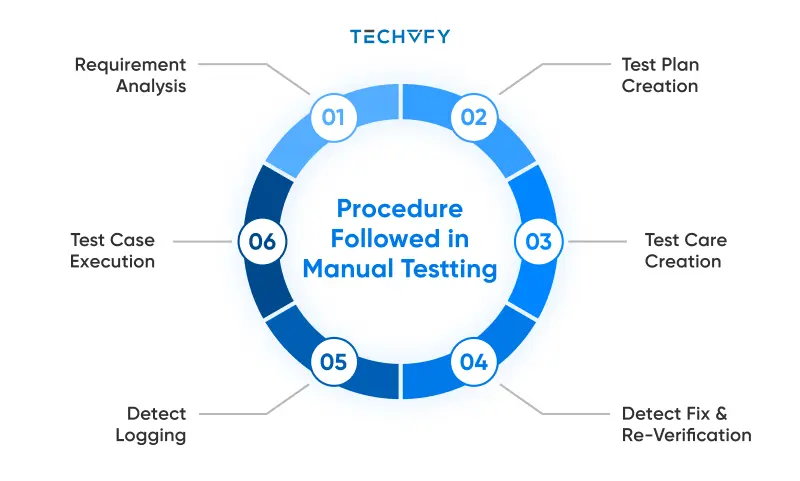
Differentiate between manual and automation testing
Manual testing can be very labor-intensive. Testers are required to manually enter test data, interact with application elements, and repeat these actions with each code change to ensure nothing is broken. This repetitive process, such as logging in and out after every update to verify the login functionality, can be exhausting but is critical, as a malfunctioning login system could have severe business implications.
To illustrate the workload involved in manual testing, let’s consider an eCommerce website. Numerous features and functionalities need to be tested, including:
Automation testing involves executing test scripts that simulate user actions and interactions with the software in a predefined sequence. To begin, a Test Framework is essential. This framework equips testers with the necessary tools to create, execute, debug, and manage automated test scripts.
Organizations generally have two options: purchase a testing tool from a vendor, which comes with built-in test frameworks, or build their own framework using open-source libraries. While building an in-house solution offers greater customization and ensures better compatibility with the existing tech stack, it requires significant time and resources. On the other hand, purchasing a tool allows teams to get started quickly, thanks to the availability of pre-built features.
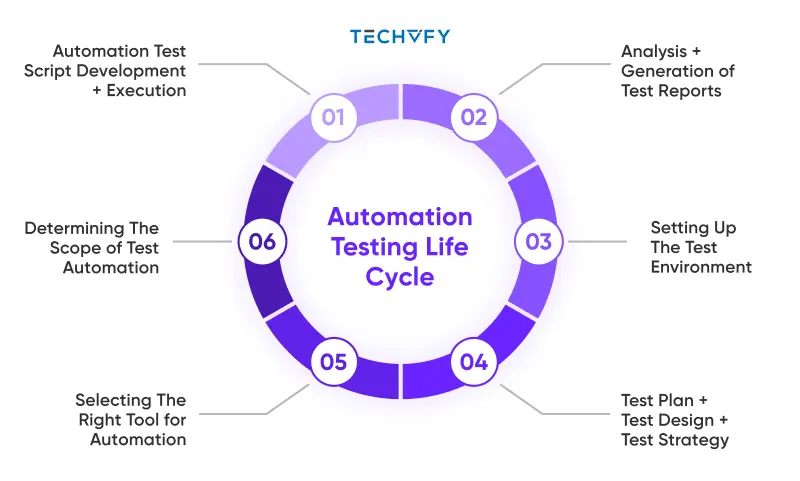
What is manual testing and automation testing
Once the tools and frameworks are in place, automation testing follows the same Software Testing Life Cycle. The process begins by identifying which test cases to automate, typically focusing on repetitive, time-consuming, and critical tasks.
Next comes Test Case Development. Popular libraries like Selenium are often used to create test scripts. Many automation tools also come with built-in keywords for common actions (e.g., click, input) and validations (e.g., check if an element is present). These keywords can be customized and parameterized for different scenarios. For example, a “click” keyword might accept an element’s ID or name as a parameter to perform the action.
Have a Project Idea in Mind?
Get in touch with experts for a free consultation. We’ll help you decide on next steps, explain how the development process is organized, and provide you with a free project estimate.
For your convenience, we have prepared a side-by-side comparison of the two testing approaches:
| Aspects | Manual Testing | Automation Testing |
|---|---|---|
| Definition | Testing software manually by humans without automation tools or scripts. | Utilizing automation tools or human-written scripts to test software |
| Human Intervention | Requires significant human intervention and manual effort. | Requires minimal human intervention once scripts are set up. |
| Speed | Relatively slow due to manual execution. | Significantly faster as tests are executed by tools. |
| Reliability | Prone to human errors. | More reliable as it eliminates human error. |
| Reusability | Test cases are harder to reuse. | Test cases can be easily reused across multiple cycles. |
| Cost | Can be expensive due to ongoing human resource needs. | Higher initial costs but cheaper over time as tests are reused. |
| Scope | Limited scope due to time and effort constraints. | Broader scope as more tests can be executed in less time. |
| Complexity | Struggles with complex tests requiring multiple iterations. | Can handle complex tests with ease using scripts. |
| Accuracy | Depends on the tester’s skill and experience. | More accurate as it follows predefined rules and logic. |
| Maintenance | Easier to maintain as there are no scripts to update. | Requires ongoing maintenance of scripts and tools. |
| Skillset | Requires skilled manual testers. | Requires skilled automation engineers or developers. |
The discussion surrounding manual versus automated testing has continued ongoing in the software testing field for quite some time. Deciding which approach to use depends on a clear understanding of the software’s scope, the target audience, and the requirements. Let’s dive deeper into the core differences and benefits of each approach.
Despite the growing prevalence of automation, manual testing still has its place in certain scenarios.
Manual testing is often the best choice during the early stages of development when the software is still evolving. At this point, the application is typically unstable, and investing in automation may not be cost-effective. Manual testing allows for quick identification of bugs and bottlenecks, with faster turnaround times for fixes.
Ad-hoc testing, where QA specialists randomly test various functionalities without predefined test cases, is best suited for manual execution. This unstructured testing approach allows testers to explore the system and identify unexpected issues.
Testing the visual aspects of the user interface (UI) is another area where manual testing excels. Testers can manually assess design elements, detect visual defects, and ensure that the UI matches the intended layout. Manual testing for UI also reduces the risk of false negatives, which can cause unnecessary extra work for development teams.
Manual testing is ideal for exploratory testing and evaluating user experience (UX). These tests involve assessing how real users interact with the software, providing valuable insights that automation tools cannot replicate. Additionally, manual testers can handle complex, nuanced scenarios that may not be suitable for automation.
Difference between manual testing and automation testing
Automation testing is particularly useful in scenarios where manual testing falls short.
Automation shines in regression testing, where the same test cases must be executed repeatedly after each update or change to ensure the system hasn’t been broken. Automated regression testing is faster, more reliable, and more consistent than manual testing.
When testing across multiple browsers, devices, and operating systems, automation is the clear choice. It allows tests to be executed simultaneously across different environments, saving time and ensuring thorough compatibility checks.
For tests that need to be run frequently, automation is more efficient. These tests can be scheduled to run at any time, without the need for manual intervention. This is particularly useful for large-scale projects with extensive testing needs.
Guaranteeing that your application provides a seamless user experience is non-negotiable. Whether you’re leveraging manual testing for its intuitive and flexible approach or embracing automation testing for its speed and scalability, both strategies play crucial roles in maintaining software quality. Each testing method has its strengths and is best suited for specific stages of development or types of testing.
However, mastering the difference between manual testing and automation testing requires expertise and careful planning. At TECHVIFY, we specialize in delivering tailored, high-quality software solutions that meet your business needs. Let our team of experts guide you through the best testing practices to ensure your software works perfectly—every time.
Contact TECHVIFY today for a free consultation. Don’t leave your software’s success to chance—partner with the professionals and ensure it’s built to perform.
TECHVIFY – Global AI & Software Solutions Company
For MVPs and Market Leaders: TECHVIFY prioritizes results, not just deliverables. Reduce time to market & see ROI early with high-performing Teams & Software Solutions.