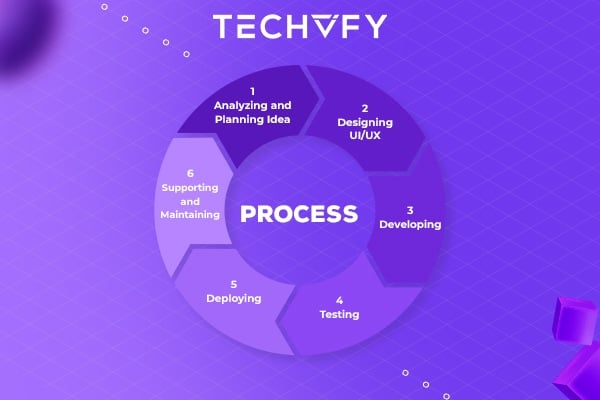
6 Basic Steps In Mobile App Development Process
Author
The TECHVIFY Team is a group of experienced professionals passionate about technology and innovation.
Let TECHVIFY introduce you to the 6 basic steps of a mobile app development process. By learning about these steps, business owners could have better control over the process in general.
Mobile app development is bringing massive benefits to our daily life. Not only is incredibly useful in daily routines, but mobile app development is also a helpful assistant to enterprises in managing a business. Therefore, going digitalized with mobile app development is an unavoidable trend that business owners should follow, to ensure a stable position in the market.
TECHVIFY Offers: Mobile Application Development Services
Step #1: Analyzing and Planning Ideas
The very first step of an ideal mobile app development process is to define the most suitable strategy for your app. Before you start your mobile app development process, it’s necessary to clarify your app’s vision. Answering these questions upfront will be helpful in identifying the most important criteria in developing a mobile app:
- What is the aim of your mobile app? What problem (or problems) will your app solve for your users?
- Who is the target audience? Who are the prospective users?
- What features are important? What features would help the app to stand out in the market?
- What Mobile OS platforms will you build the app for? Will you choose Native or Cross-platform or Hybrid?
- Do the competitors have a similar app? If yes, what features do they offer?
- What is the overall app development allocation in terms of time, effort, and money?
- By when do you want to launch your app?
- How are you going to promote your app?
- How are you going to keep your app up-to-date? Who will update the bugs once the app is launched?
By noting down every criterion, you want to include in your app, you will focus your vision on a clearer picture of your app idea. With this in mind, you can go deeper into the next phase, which is preparing a product roadmap.
An ideal product roadmap should prioritize the mobile app requirements and group them into delivery milestones. If time, resources, or costs are a concern, then define your minimum-viable product (MVP) and prioritize this for the initial launch.
Step #2: Designing UI/UX
How well the user interface (UI) and experience design (UX) perform is a crucial factor determining the success of any mobile app development process. The goal for mobile app UI / UX design is to create excellent user experiences making your app interactive, intuitive, and user-friendly. While UI design provides the visual that attract users at first, an intuitive UX design is a key component to ensure users’ engagement.
Multiple aspects discussed below should be taken into consideration in the design process:
- Information Architecture & Workflows: Information architecture is the design framework in which the data, interface, and functionality of the app are specified and detailed. A workflow diagram will help to identify every possible interaction a user has with the app and the app’s navigation structure. Ideally, these two must be finalized before establishing the design details because it includes details about the platform and also how the app fits within the platform.
- Wireframes: Wireframes are conceptual layouts, also referred to as low-fidelity mockups. It provides a visual indication of the app and illustrates important details like the size of the elements and their placement of them.
- Style Guide: Style guides are all about standards, usability, and consistency, provide the details of various app functions. Establishing a style guide early on as part of your mobile app development process improves the productivity of your mobile app developers, helps to keep your app’s look and feel consistent.
- Mockups: A mockup, or a high-fidelity design, is a rendering of the app’s visual design. It is created by combining wireframes with your style guide design standards and provides the interconnection between various elements of visual design. Your mockups may lack the logic and intelligence as expected, but as your app’s design begins to get finalized, further modifications to its information architecture, workflow, and aesthetics will be implemented.
- Prototypes: A prototype is a rapid version of the originally intended app, specifically required if the technology is new, concepts are untested or there is uncertainty about the app development. While mockups are dummy runs of the app, prototypes provide the “real feeling” or “demo” version of the app. Prototypes is very helpful in understanding the UI, UX and the app’s flow of work that is expected from the finished product.
Check out our case studies: How TECHVIFY visualize a mobile app development for sales management
Step #3: Developing
The developing stage includes multiple activities such as establishing the development environment, developing various parts of the code, preliminary testing and creating the app that can be installed and tested.
A typical mobile app project is made up of three integral parts: back-end/server technology, API(s), and the mobile app front-end.
- Back-End/Server Technology: This part includes database and server-side objects required for supporting functions of your mobile app.
- API: An Application Programming Interface (API) is a method of communication between the app and a back-end server/database.
- Mobile App Front-End: The front-end is the native mobile app an end-user will use.
Almost any web programming language and database for the back-end can be used for app development. For native mobile apps, you can choose a technology stack required by the targeted mobile platform – Android or iOS. Objective-C or Swift programming languages are used for developing iOS apps, while Java and Kotlin are popular for Android app development. Thus, there is more than one programming language and technology stack for building mobile apps. The key is picking a technology stack that is best suited for your mobile app.

Step #4: Testing
Testing is a crucial stage in the mobile app development process. It lets you know the quality of the app by identifying defects in the app and resolving them. The testing phase may overlap with the development stage in many ways, and this depends on the way the development is planned and executed.
App testing comprises various types such as user experience testing, functional testing, performance testing, security testing, and device and platform Testing. The testing phase is completed when all problems and bugs are resolved, and the app is approved for launch by the project manager.
Step #5: Deploying
Deploying stage marks the beginning of the market phase of the app. This could require the deployment of the backend before the app can be published in the app stores for downloads.
Launching a native mobile app requires submitting your app to the app stores, Apple App Store for iOS apps, and Google Play for Android apps. However, you will need a developer account with Apple App Store and Google Play Store before launching your mobile app. Listing the app requires meeting the specific guidelines of the respective app store.
Step #6: Supporting and Maintaining
In the Supporting and Maintaining phase, the mobile app development team implements app monitoring tools (e.g., Crashlytics, Google Analytics, Firebase) to your product. Thanks to these tools, developers can detect crashes, follow the app’s statistics, and plan product enhancements. A good app maintenance service should make sure your app stays attractive, adapt to changing market conditions, and users’ feedback.